Google turns Chrome into an AI co-worker for the workplace
Google is bringing Gemini-powered “auto browse” capabilities to Chrome for enterprise users, enabling automation of tasks like research, data entry, and scheduling. The company is also expanding security features to help IT teams manage AI usage and detect unsanctioned tools.

As part of its Google Cloud Next announcements, Google revealed plans to bring “auto browse” agentic capabilities to Chrome users in the enterprise, alongside enhanced security measures.
Gemini-powered automation inside Chrome
With auto browse, Chrome users can use Gemini to understand the live context in their open browser tabs and handle tasks such as booking travel, inputting data, scheduling meetings, and other web-based work.
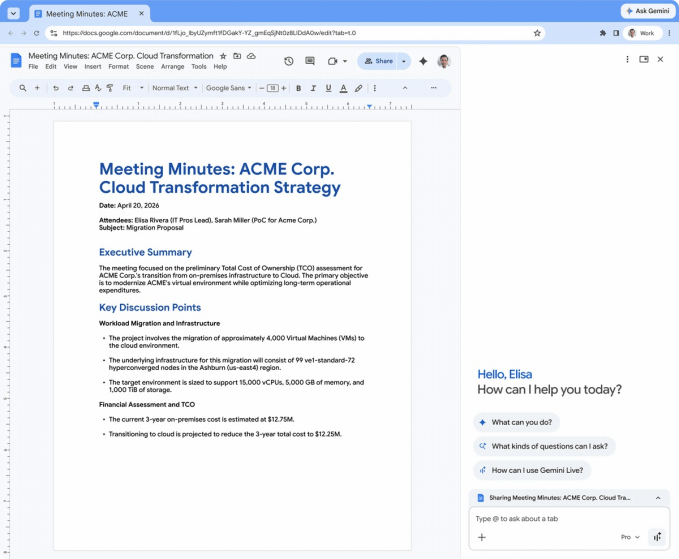
Google says the tool can assist with tasks like inputting information into a company’s preferred CRM system based on content in a Google Doc, comparing vendor pricing across multiple tabs, summarizing a candidate’s portfolio before an interview, and pulling key data from a competitor’s product page.
The workflows will still require a “human in the loop,” meaning users must manually review and confirm the AI’s input before any final action is taken. The goal, according to Google, is to speed up tedious tasks and free workers to focus on more “strategic work.”
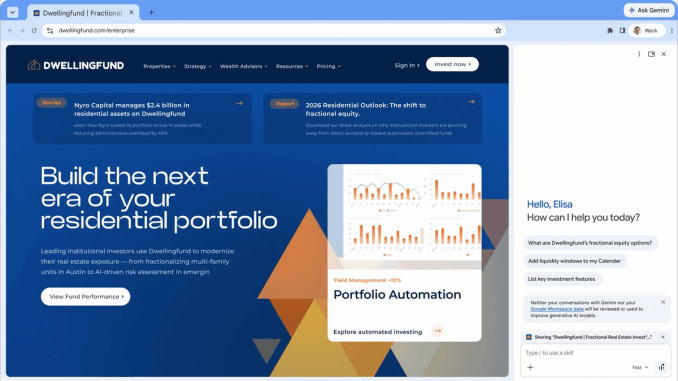
The broader promise from AI advocates is that the technology will give people time back. However, studies have suggested that AI may intensify work rather than reduce it. How this dynamic will unfold at the enterprise level remains to be seen, particularly if managers expect employees to complete more tasks in less time.
Availability and workflow “Skills”
The feature will initially be available to Workspace users in the U.S. It can be enabled via an admin policy, and Google says that an organization’s prompts will not be used to train its AI models.
Like the consumer-facing version, Workspace users can save common workflows as reusable “Skills.” These can be accessed by typing a forward slash (“/”) or by clicking the plus sign to select the needed Skill.
Enterprise security and Shadow IT detection
Beyond embedding AI into Chrome, Google is emphasizing its ability to detect unsanctioned AI tools in the workplace through Chrome Enterprise Premium. The company is expanding these capabilities to help IT teams identify compromised browser extensions or other AI services, specifically what it calls “anomalous agent activity.”
Google refers to this expanded capability as “Shadow IT risk detection,” giving IT teams visibility into the use of both sanctioned and unsanctioned GenAI and SaaS sites across their organization. This positions Chrome not only as a productivity tool but also as a control point for enterprise AI adoption.
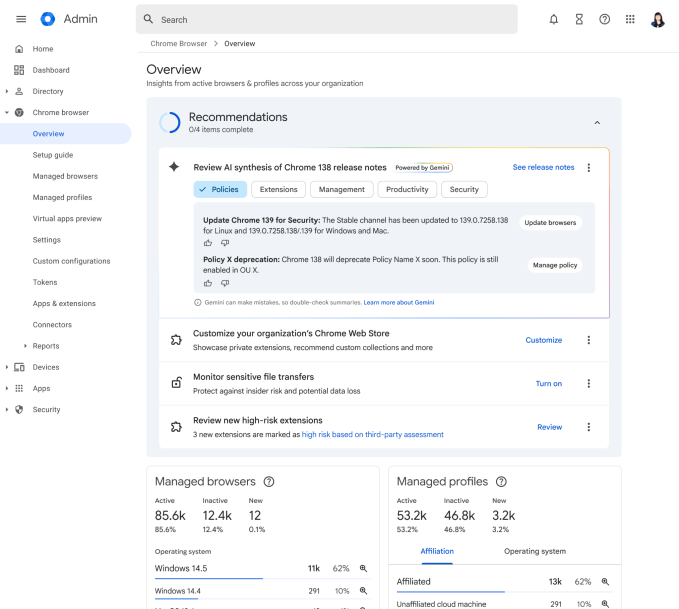
IT teams will also receive a “Gemini Summary” of Chrome Enterprise release notes and other AI-powered suggestions. These summaries highlight critical changes, new policies, upcoming deprecations, and recommendations such as configuring new settings or reviewing managed browsers.
Google also announced an expanded partnership with Okta to secure the agentic workplace, adding features designed to reduce session hijacking and enhance protections. Additionally, the company is upgrading security controls for extensions and introducing Microsoft Information Protection (MIP) integration to help organizations enforce consistent security policies.